ResearchEngineering note
Fine-tuning Gemma took 19 minutes. The phone did not.
Our Gemma 4 E2B fine-tune trained in 19 minutes. Getting it onto a phone meant memory limits, a broken chat template, a 5 GB file and a bug that deleted it.
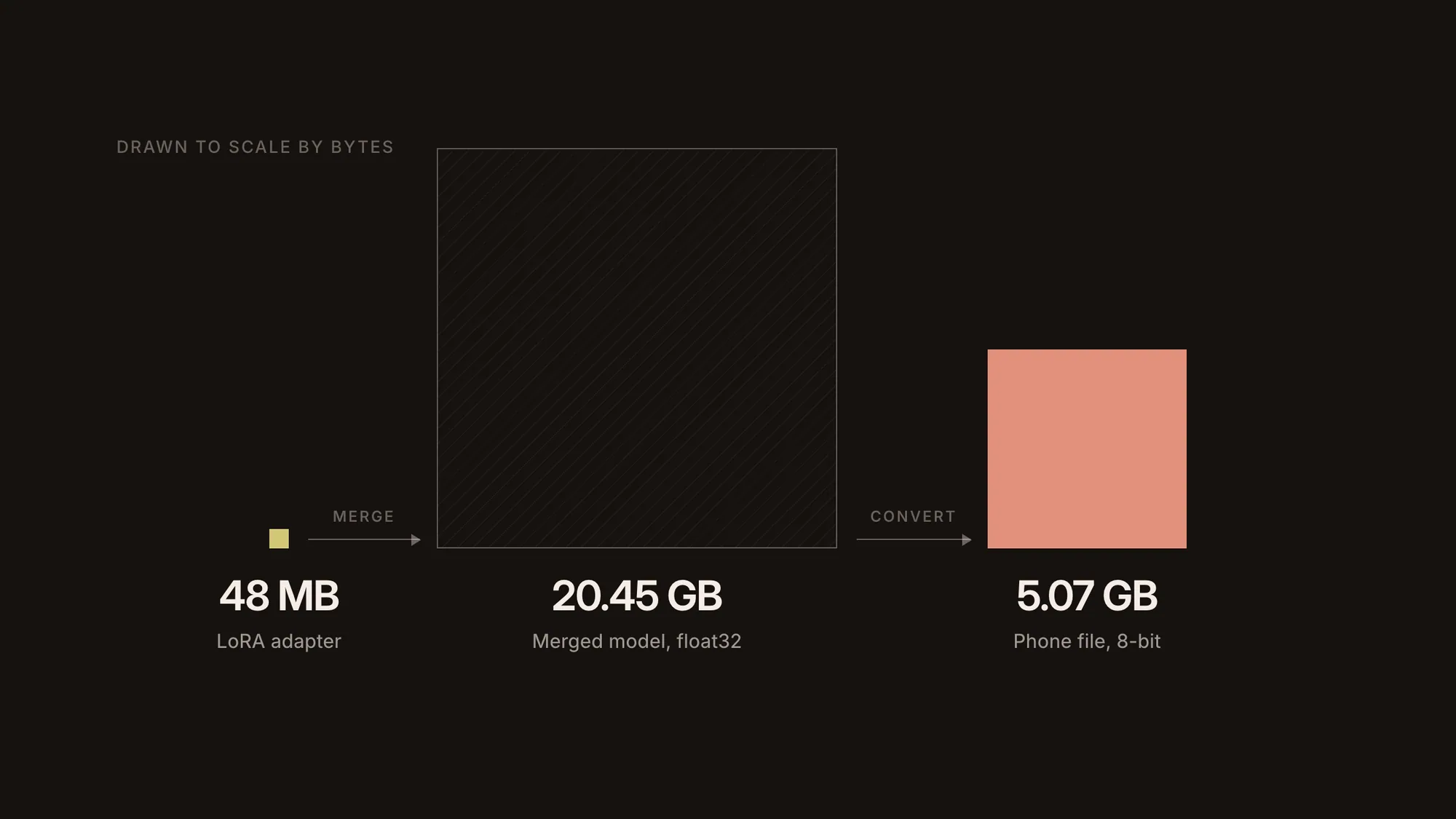
On 9 August 2026, a training run finished on a single NVIDIA A10. It had taken 19 minutes and 12 seconds: one epoch over 1,904 synthetic conversations in English and Kiswahili, 249 optimizer steps, and a 48 MB LoRA adapter at the end.
That adapter turns Google’s Gemma 4 E2B into the assistant in the SafeRide Android preview, an app that helps women in Kenya document harassment, find support and choose what leaves their phone. Because of what people may tell it, the assistant runs on the phone, not on a server.
The next day, the conversion itself took nine minutes.
None of that was the hard part. The signed Android preview that runs the model went out on 18 August, nine days after training. Along the way, and in the weeks of groundwork before, our conversion ran out of memory, the converted file failed on its first message, it came out twice the size of Google’s own, and our integrity check deleted a perfectly good copy of the model from a phone.
This post is about that part, the one fine-tuning tutorials leave out. (Building the training data and the evaluations took weeks of their own; they are the next posts.) Every number here comes from our build records or from the public files, and the model, adapter, training data and code are open, so you can check our work.
What actually ships
A LoRA adapter is a set of small matrices, 12.1 million parameters in our case, about 0.24% of the model. They only mean something on top of the exact base weights they were trained against. On a server you can load the base model and the adapter side by side. On the phone, SafeRide uses LiteRT-LM, Google’s runtime for on-device language models, and it loads one complete .litertlm file: weights, tokenizer and chat template together. Its Android API has a LoRA setting, but it does not take a PEFT adapter as it comes out of training, and we have not built that path.
Gemma 4 E2B stores 5.1 billion parameters. The “E2B” means 2.3 billion effective parameters, and most of the rest are per-layer embeddings: each of the model’s 35 layers keeps its own small vector for every one of the 262,144 tokens in the vocabulary, 2.35 billion numbers in all. Google’s model card describes them as large tables used only for quick lookups. They cost almost nothing to compute, but every one of them still has to be stored.
So shipping 48 MB of adapter means rebuilding the whole model:
- Merge the adapter into the base model. Merged in float32, that is a 20.45 GB checkpoint.
- Convert the merged model with LiteRT Torch: trace it, lower it to MLIR and quantize the weights.
- Package the result with the LiteRT-LM builder into a single 5.07 GB file.
- Ship it: host it, download it in the app, verify it and load it through a native bridge.
This is the conversion call from our exporter, with the values we used:
# scripts/saferide-gemma4-tuned-litertlm-export.py (abridged)
hf_export(
    model=str(merged_dir),
    output_dir=str(export_dir),
    task="text_generation",
    cache_length=2048,            # the context window on the phone
    prefill_lengths=[128],
    quantization_recipe="dynamic_wi8_afp32",
    externalize_embedder=True,
    bundle_litert_lm=True,        # write one .litertlm file
    export_vision_encoder=False,  # text only
    export_audio_encoder=False,
    use_jinja_template=True,
)
Why a free GPU could not convert it
An earlier fine-tune, which we later replaced, never reached a phone at all. In July we tried to convert it on Google Colab, where the only GPU our account could select was an NVIDIA T4 with 15 GB of memory. The premium GPUs were listed but greyed out.
The merge worked: 10.24 GB of float16 weights. The conversion never did. We tried six times:
| Attempt | KV cache | Prefill | Where it stopped |
|---|---|---|---|
| Full run, default settings | — | — | Runtime reset during export |
| Conversion only | 1,024 | 128 | Runtime reset while loading the model |
| float16 converter flag | 512 | 32 | expected scalar type torch.float32 but found torch.float16 |
| float16 weights only | 512 | 32 | Stalled at “Create MLIR Module”, system RAM at its ceiling |
| Ultra-low profile | 128 | 16 | Killed by SIGKILL at “Create MLIR Module” |
| Smallest possible, split cache | 16 | 1 | Killed by SIGKILL at “Create MLIR Module” |
We cut the KV cache 64-fold, from 1,024 tokens to 16, and the prefill from 128 tokens to one. It still died at the same step. That step lowers the whole model into MLIR, weights and all, so its memory grows with the weights, and next to five billion parameters the cache barely registers. The T4’s 15 GB of GPU memory was never the limit. Colab’s system RAM was, and the conversion that finally worked needed about 25 GB of it.
Three weeks later, with the final adapter, we ran the same conversion on a machine with 196 GiB of RAM, on CPU only: its GPU driver was too old for the PyTorch 2.12 that the conversion stack required. That did not matter. The merge produced a 20.45 GB float32 checkpoint, the converter sat at about 25 GB of resident memory while lowering, and the decoder shrank from 9.1 GB to 2.3 GB. The conversion finished in about nine minutes.
So if you are converting Gemma 4 E2B, budget for memory, not for a GPU: plan on about 25 GB of RAM for the conversion itself. We have only run it on a much larger machine, so we cannot tell you the smallest one that works.
Smaller cuts
Each of these cost us a run. If one of them brought you here, this is what fixed it.
operator torchvision::nms does not existon Colab: the preinstalled torchvision did not match the PyTorch that LiteRT Torch needs. Installing LiteRT Torch’s own requirements fixed it.- A torchaudio build that no longer matched PyTorch: we uninstalled torchaudio, which conversion does not use.
- A protobuf version clash: upgrade protobuf to 6.31.1 or later. Then restart the runtime once and check every import before you start a long run.
- Transformers 5.5.4 was too old for LiteRT Torch’s backend registration. Pin 5.14.1.
- Our container had no
git, so our wrapper crashed after LiteRT had already written a good file. Check for the file before you rerun anything. - LiteRT-LM’s runtime wanted
libvulkan.so.1even on the CPU backend. Install the Vulkan loader in the container.
The file that could not chat
A quarter of an hour after conversion, we sent the new file its first message, in a container with no network. It loaded, then failed:
Failed to send message: INTERNAL: Failed to apply template:
unknown method: map has no method named get (in template:238)
Every chat model needs a chat template: a small Jinja program that turns a list of messages into the exact token sequence the model was trained on. A .litertlm file carries its own. Because we passed use_jinja_template=True, the exporter embedded the template that ships with the Hugging Face model. Line 238 of it reads:
{%- set thinking_text = message.get('reasoning') or message.get('reasoning_content') -%}In Hugging Face Transformers, templates run in Python’s Jinja2, where each message is a Python dict and .get() simply works. LiteRT-LM renders templates with its own engine, and in version 0.15.0, the Python release we tested with, maps had no get method. We have not retested later versions. That template calls .get() 14 times. Google’s LiteRT-LM template for Gemma 4 calls it none; it writes value['description'] instead.
We were not the first to hit this. In July, Jaydeep Shah described the same error while building Redacto, another app running a fine-tuned Gemma 4 E2B on the phone, and patched the template before export. We found it after export, so we fixed the file instead.
That did not need another conversion. A .litertlm file is a container of independent sections, each starting on a 16 KiB boundary. Ours had six: the model metadata, which holds the template; executor settings; the tokenizer; and three model graphs. We rebuilt only the metadata section, with Google’s Gemma 4 template from the LiteRT-LM repository, and kept the other five byte-for-byte identical. The new file’s header says it was written at 10:18:49 UTC, five minutes after the failure.
The repacked file is exactly 16,384 bytes smaller than the first. That is one alignment block: the shorter template let the metadata fit in one 16 KiB block instead of two, and every section after it moved up. The first file never left the build machine, and the app’s revocation list names it anyway.
Swapping templates raises a fair question: we trained with Hugging Face’s template and serve with Google’s. So we rendered all 1,904 training conversations with both, in Jinja2 set up the way Transformers sets it up. Every one came out byte-for-byte identical, both the prompt the phone sends and the whole conversation as training saw it, for the 1,376 single-turn conversations and the 528 with two turns alike. Each prompt has this shape:
<bos><|turn>system
{system prompt}<turn|>
<|turn>user
{message}<turn|>
<|turn>model
LiteRT-LM uses its own engine, so this compares the templates, not the engines. As written, though, the swap changed the template’s code and not the prompt it produces.
A converted model that loads is not a model that works. Send a real conversation through the target runtime before you call a conversion done, and treat the chat template as part of the model, because it is.
Why our file is twice the size of Google’s
Google publishes its own LiteRT-LM build of Gemma 4 E2B: 2,588,147,712 bytes. Ours is 5,071,837,136 bytes, 1.96 times larger. SafeRide asks for 5.6 GB of free space before it downloads the model, and offers it only on phones with 8 GB of RAM or more, a planning floor rather than a measured one.
A .litertlm file starts with a header that lists every section and its byte range, so you can see where the bytes go without downloading either file. This is what the two headers say:
| Section | SafeRide v0.5.8 | Google’s Gemma 4 E2B |
|---|---|---|
| Decoder (the transformer layers) | 2,302 MB | 818 MB |
| Per-layer embeddings | 2,355 MB | 1,285 MB |
| Token embeddings | 409 MB | 104 MB |
| Vision and audio encoders | — | 332 MB |
| Draft model for speculative decoding | — | 44 MB |
| Tokenizer and metadata | 6 MB | 5 MB |
| Whole file | 5,072 MB | 2,588 MB |
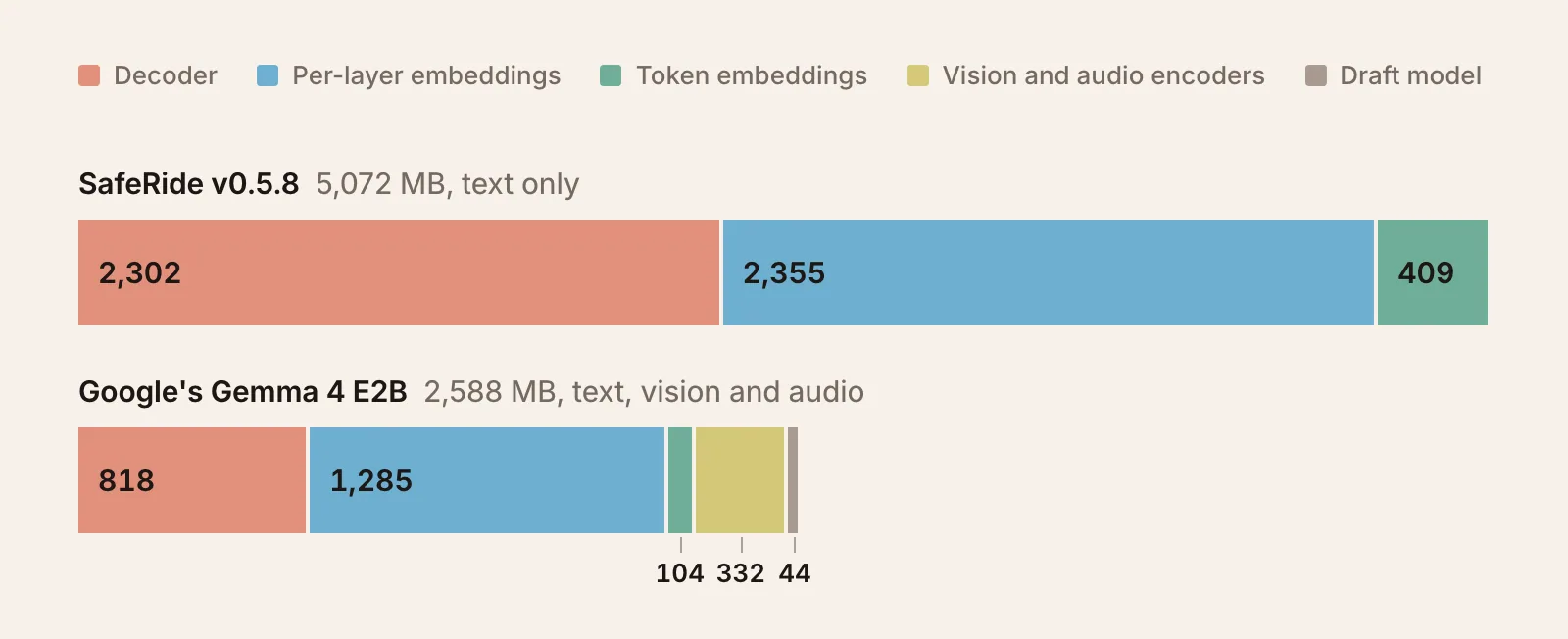
Ours is twice the size and holds less. We exported text only. Google’s file also carries Gemma’s vision and audio encoders and a small draft model that speeds up decoding. Every section we share is bigger in ours: the decoder 2.8 times, the per-layer embeddings 1.8 times, the token embeddings 3.9 times.
The reason is the quantization_recipe in the conversion call. dynamic_wi8_afp32 stores every weight as an 8-bit integer and keeps activations in float32 between operations: about one byte per parameter, everywhere. The header lets you check. The per-layer embeddings are 262,144 tokens × 35 layers × 256 values, or 2,348,810,240 numbers, and our section holding them is 2,355,107,792 bytes. Google’s build uses its Gemma 4 mobile quantization scheme, which mixes 2-, 4- and 8-bit weights. In its file the same tables take about 4.4 bits a number, and the token embeddings about 2.1.
A smaller build is mostly a different recipe in the same call. The open question is quality: Google’s scheme comes with quantization-aware training, and our fine-tune was never trained for fewer bits. Whether it keeps its behaviour at four bits or fewer, especially in Kiswahili, is our next experiment. The advice is simpler: choose the recipe before you fine-tune, and convert the untouched base model with it first. One conversion of the base model would have shown us a 5 GB file on day one.
File size and memory are different budgets, though. On a Linux server, LiteRT-LM ran our 5.07 GB file at a peak of 3.0 GiB of resident memory. That fits what Google’s model card says, that the runtime memory-maps the embedding tables rather than loading them whole. We have not yet measured it on a phone.
See for yourself
This script reads the header of any .litertlm file with a single range request, so it works on a 5 GB file on Hugging Face without downloading it. It needs only the Python standard library, and follows the layout in LiteRT-LM’s header schema.
# litertlm_sections.py: list a .litertlm file's sections from its header.
# Layout from LiteRT-LM's schema/core: the bytes "LITERTLM", three uint32
# version numbers, 4 bytes of padding, a uint64 header end, then a FlatBuffer
# (litertlm_header_schema.fbs) describing every section.
import struct
import sys
import urllib.request

TYPES = ["NONE", "GenericBinaryData", "Deprecated", "TFLiteModel", "SP_Tokenizer",
         "LlmMetadataProto", "HF_Tokenizer_Zlib", "TFLiteWeights", "EmbeddingMetadataProto",
         "ExecutorMetadataProto", "Text2SpeechMetadataProto", "Speech2TextMetadataProto",
         "Text2ImageMetadataProto", "Any2AnyMetadataProto"]


def sections(url):
    request = urllib.request.Request(url, headers={"Range": "bytes=0-65535"})
    raw = urllib.request.urlopen(request).read(65536)
    assert raw[:8] == b"LITERTLM", "not a .litertlm file"
    (header_end,) = struct.unpack_from("<Q", raw, 24)
    buf = raw[32:header_end]
    num = lambda fmt, at: struct.unpack_from(fmt, buf, at)[0]
    ref = lambda at: at + num("<I", at)  # follow a FlatBuffer offset

    def field(table, index):  # where field `index` of a table lives, or None
        vtable = table - num("<i", table)
        if 4 + 2 * index >= num("<H", vtable):
            return None
        offset = num("<H", vtable + 4 + 2 * index)
        return table + offset if offset else None

    def vector(at):
        start = ref(at)
        return [ref(start + 4 + 4 * i) for i in range(num("<I", start))]

    def string(at):
        start = ref(at)
        return buf[start + 4:start + 4 + num("<I", start)].decode()

    metadata = ref(field(ref(0), 1))  # LiteRTLMMetaData.section_metadata
    for section in vector(field(metadata, 0)):
        begin, end = num("<Q", field(section, 1)), num("<Q", field(section, 2))
        name = TYPES[buf[field(section, 3)]]
        for item in vector(field(section, 0)) if field(section, 0) else []:
            if string(field(item, 0)) == "model_type":  # e.g. tf_lite_prefill_decode
                name = string(field(ref(field(item, 2)), 0))
        yield name, end - begin


for name, size in sections(sys.argv[1]):
    print(f"{size:>15,}  {name}")
Run against our file, it prints:
$ python3 litertlm_sections.py https://huggingface.co/esherialabs/saferide-gemma-4-e2b-litert-lm/resolve/v0.5.8/saferide-gemma-4-e2b-v0.5.8.litertlm
         16,186  LlmMetadataProto
          1,996  ExecutorMetadataProto
      5,545,536  HF_Tokenizer_Zlib
  2,302,160,800  tf_lite_prefill_decode
    408,950,144  tf_lite_embedder
  2,355,107,792  tf_lite_per_layer_embedder
The native bridge
SafeRide is a React Native app built with Expo. LiteRT-LM has an Android library but no React Native one, so the app talks to it through a small Kotlin native module.
Calling LiteRT-LM through reflection. LiteRT-LM’s Android package, version 0.13.1 in June, was built with a newer Kotlin than Expo SDK 56’s compiler accepts, and our release build failed at :app:compileReleaseKotlin. The quick fix was a compiler flag that skips Kotlin’s metadata check for the whole app. We could also have raised the app’s Kotlin version or written the bridge in Java. The smallest change came from how the bridge was already written: it reaches LiteRT-LM only through reflection (Class.forName), so it never needs the library at compile time. We made the dependency runtimeOnly. Gradle packages it into the APK, but it never touches the Kotlin compile classpath, and a keep rule stops R8, Android’s code shrinker, from removing classes that nothing references directly.
// Added by our Expo config plugin (plugins/withSafeRideLiteRtLm.js)
runtimeOnly("com.google.ai.edge.litertlm:litertlm-android:0.16.0")
Reflection gives up compile-time checking, so the library version is pinned, and changing it means testing on a device again. The config plugin and the native module are both public.
Checking every file against a list in the app. Before every load, the module checks the requested file against an exact list compiled into the app. A file loads only if its model ID, manifest ID, file name, size in bytes and SHA-256 all match one entry: Google’s base model, or ours.
// SafeRideLiteRtLmModule.kt (abridged)
val approved = APPROVED_ARTIFACT_BINDINGS.any { binding ->
  binding.modelId == config.modelId &&
    binding.manifestId == config.manifestId &&
    binding.fileName == expectedFileName &&
    binding.sizeBytes == expectedSizeBytes &&
    binding.sha256 == expectedSha256
}
if (!approved) {
  throw BridgeError(ERR_UNSUPPORTED_MANIFEST, "This local model is not approved for this build.")
}
The file must also sit inside the app’s own storage, and the native side hashes the whole file with SHA-256 before every load, whatever the JavaScript layer has already checked. The JavaScript check decides once whether a download arrived intact. The native check guards every load, at the cost of reading all 5 GB on each cold start. Then the module tries the GPU and falls back to the CPU. If any check fails, the on-device assistant does not start, and nothing silently swaps in a different model.
The bridge is simple today: it sends the latest message with the system prompt and returns the whole reply when generation ends. Streaming and conversation history are the next pieces of work.
Getting 5 GB onto a phone
Before the app downloads the model, it shows the exact size, asks for consent and checks free space. It will not start when Android cannot report the connection type, and a metered connection needs a second yes. The download uses HTTP range requests, so it can pause and resume. When the bytes are in, the app checks the file’s SHA-256 against the value pinned in the app.
On 14 August we tried it for real, on a Xiaomi POCO running Android 16 with about 11 GB of RAM.
- The app estimated 38 minutes. The download took about three hours, pauses included: we paused it twice on purpose and moved to a different Wi-Fi network along the way. Resuming across networks worked.
- The screen said “Preparing” the whole time. The app tracked progress internally; the screen never showed it.
- With the bytes in, the app started hashing 5 GB on React Native’s JavaScript thread. That thread held a full CPU core and the app ran at 116 to 167% CPU, still with nothing on screen. Because the hashing ran as ordinary JavaScript inside the app, it paused whenever the app left the screen, first for a WhatsApp call and then for Twitter, and carried on when the app came back. The phone stayed cool: the battery read 35.6 °C, with no throttling.
- We closed the app and opened it again. It asked us to download the model again.
That evening we split the setup screen into separate checking, downloading, verifying and loading states, each with its own progress, and made the app remember a verified file, so a restart would not download it again or hash it again in JavaScript. That fix made the app honest about what it was doing. It did not find the bug underneath.
The bug that deleted the model
The next day, the tester’s message was short: “Every time I go back to it, it asks me to download the model.”
The model was gone. Our verifier read the file in 4 MiB chunks with readAsStringAsync from Expo’s legacy file-system API, as Base64 text that JavaScript then decoded, passing the byte offset as position. Expo’s legacy Android code stores that offset in a 32-bit Int, so it cannot go past 2,147,483,647, one byte short of 2 GiB. Our file is 5,071,837,136 bytes. As soon as verification crossed 2 GiB the read failed, and this is what the code did with the failure:
// src/lib/localAssistant/modelStorage.ts, before the fix (abridged)
async function validateChecksum(/* ... */): Promise<boolean> {
  try {
    const digest = await sha256FileInChunks(uri, fileSize /* ... */);
    return digest === file.sha256;
  } catch (error) {
    return false; // a failed read is reported as a bad checksum
  }
}

const isValid = await validateChecksum(config, file, target, info, onProgress);
if (!isValid) {
  await FileSystem.deleteAsync(target, { idempotent: true });
  throw new Error(`Checksum mismatch for ${file.fileName}`);
}
A failed read looked like a checksum mismatch. A mismatch meant a corrupt file, so the app deleted it: five complete, correct gigabytes, every time.
The fix had two parts. The verifier now reads through Expo’s newer File API, whose file handle keeps a native 64-bit cursor. And a read it cannot finish now raises an error instead of passing as a mismatch, so a read error no longer deletes the file.
// After the fix (abridged)
// The legacy Android reader stores `position` as a 32-bit Int and cannot
// address the second half of multi-gigabyte model files. FileHandle advances
// a native 64-bit cursor, so every byte is read exactly once in sequence.
const handle = new File(uri).open(FileMode.ReadOnly);
let verifiedBytes = 0;
try {
  while (verifiedBytes < sizeBytes) {
    const length = Math.min(chunkBytes, sizeBytes - verifiedBytes);
    const bytes = handle.readBytes(length);
    if (bytes.byteLength !== length) throw new Error('Model checksum read length mismatch.');
    digest.update(bytes);
    verifiedBytes += length;
    onProgress?.(verifiedBytes, sizeBytes);
    await new Promise<void>((resolve) => setTimeout(resolve, 0)); // let the screen update
  }
} finally {
  handle.close();
}

// ...and in validateChecksum, a failed read is now an error, not a verdict:
throw new Error(`Could not read ${file.fileName} for checksum verification.`);
Two rules came out of this:
- Test every file path with a file larger than 2 GiB, on a real device. A 32-bit offset can hide anywhere between your code and the disk, and small test files never reach it.
- “I couldn’t check it” is not “I checked and it’s bad.” Delete a user’s five-gigabyte download only on positive evidence that it is wrong.
By 17 August the whole path worked on the phone: the full download, pause and resume across a network change, the size and SHA-256 checks, a restart without a second download, and chat. The signed Android preview went out on 18 August.
What we have measured, and what we have not
| Measurement | Where | Result |
|---|---|---|
| Time to first token, for a prompt of 139 tokens | Linux server, x86, CPU only, 30 threads | 0.21 s |
| Decode speed, tokens per second | Same server | 37 |
| Peak resident memory | Same server | 3.0 GiB |
| Download, pause and resume, checks, restart, chat | Xiaomi POCO, Android 16, about 11 GB of RAM | Passed |
We have not yet measured speed, memory, battery or heat for this model on a phone, recorded which backend the phone used, or run it on a phone with less than 8 GB of RAM. Because the bridge returns whole replies, time to first token is not even visible on the phone yet, and because it sends only the latest message, the two-turn conversations the model was trained on are not exercised there. A server is not a phone, and we will not quote server numbers as phone numbers.
If you are doing this next
- Choose the quantization recipe before you train. Convert the untouched base model with it and look at the file size.
- Convert on a machine with plenty of RAM, not a free GPU notebook. Gemma 4 E2B needed about 25 GB. Shrinking the cache will not save you.
- Send a real conversation through the target runtime before you call a conversion done, and check that the template you ship renders exactly what you trained on.
- Test with a file larger than 2 GiB on a real phone, then again after a restart, and again with the app sent to the background halfway through.
- Never let “couldn’t verify” delete anything.
- Pin exact identities, meaning the name, size and SHA-256, inside the app, and fail closed when they do not match.
- Design the download for hours, not minutes: visible progress for every phase, pause and resume, and a verified state that survives a restart.
We trained 12.1 million parameters in 19 minutes. Using them meant shipping 5,071,837,136 bytes to a phone.
The model, the adapter, the training data and the code are linked under Artifacts on this page. Next in this series: the dataset, and why our first one fooled us.
Questions or corrections: saferide@esheria.org